





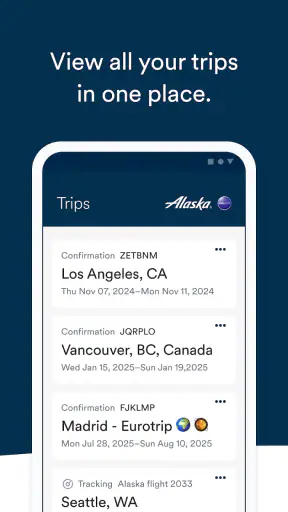
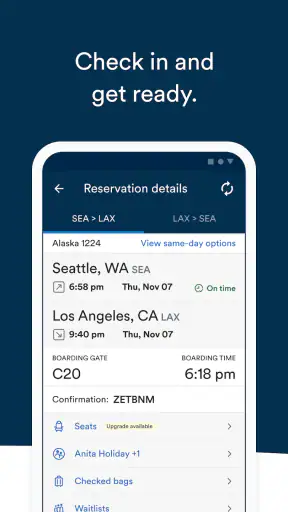
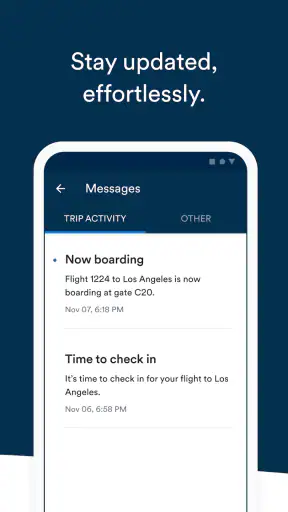

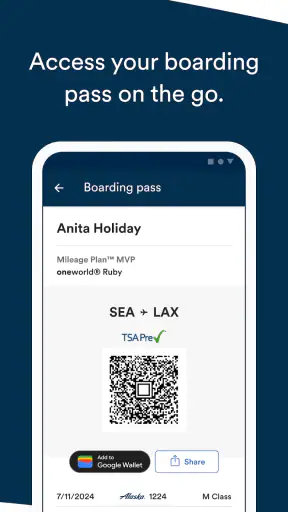
I approached Alaska Hawaiian as a practical travel companion rather than as another airline app to open once and forget. It is a free Travel & Local app from Alaska Airlines, aimed at people who want to manage flights from a phone instead of moving between a browser, email messages, airport screens, and paper notes. The store presents it as “Alaska Hawaiian,” while the app itself is most useful when treated as a single place for the parts of a trip that are easiest to lose track of.
My overall impression is positive, especially for passengers who regularly fly with the airline or already have a reservation to manage. The experience is more valuable before and during a journey than during the inspiration stage of planning one. It will not replace every travel tool, and occasional passengers may find an airline-specific app less useful than a general booking service. Still, the combination of flight access, trip organization, and mobile convenience makes it worth considering if Alaska Airlines is part of your travel routine.
How the current app fits into a real trip
The current release is version 8.16.0, and that matters because airline apps need to keep pace with changing travel workflows. A dated interface can make a simple task feel risky when you are standing in a crowded terminal. In use, I would judge this app less by flashy extras and more by whether it helps me find the right trip, check what I need, and move through the airport without repeatedly signing in or searching through messages.
That focus suits the app’s category. This is not a broad destination guide, a hotel marketplace, or a social travel planner. It is an airline-centered tool developed by Alaska Airlines. That narrow purpose is also its main strength: the information connected to an Alaska journey has a better chance of being organized in one place than it would be across unrelated travel apps.
The app has been available since November 1, 2011, so it is not a new experiment. Its audience is also substantial, with more than five million installs and an average rating of 4.1 from roughly ninety-one thousand ratings. Those figures do not guarantee that every passenger will enjoy the interface, but they do suggest that the app has become a familiar part of many travelers’ routines.
I especially like the idea of using it as a “travel checkpoint.” Before leaving home, I would open the trip and confirm that the reservation I expect to see is the one attached to my account. On the way to the airport, I would use the same place to avoid digging through old confirmation emails. At the terminal, the value is not entertainment; it is reducing the number of small decisions that compete for attention.
Where it is most useful
The strongest use case is a traveler with an upcoming Alaska Airlines booking who wants quick access to the journey on a phone. That includes people traveling for work, families coordinating a holiday, and passengers who dislike relying on a browser with several tabs open. It can also be useful for someone who books infrequently but wants a dedicated place for the flight once the reservation is made.
A realistic example is a morning departure with a child and a checked bag. Instead of asking one person to hold the booking email while another searches for the latest travel details, I would use the app as the shared reference point before leaving. During the trip, I would check it again rather than assuming that a screenshot saved the right information. That habit is more important than it sounds: screenshots become stale, while a connected airline app is designed to reflect the current trip experience.
Another useful workflow is to open the app before packing, not only at the airport. That gives me a chance to notice whether the reservation is visible, identify anything that needs attention, and make sure I am using the correct account. If the app becomes part of that preparation routine, it is less likely to be opened for the first time while I am rushing through security.
What the latest version means for established users
Version 8.16.0 is the release currently associated with the app, but I would not treat the version number alone as proof of a dramatic redesign. The more reasonable conclusion is that Alaska Airlines continues to maintain the mobile experience rather than leaving it frozen in its early form. For existing users, that usually means the app remains relevant as the airline’s digital travel channel evolves.
That distinction is useful when deciding whether to update. People sometimes expect every new version to introduce a feature they can immediately see. With an airline app, improvements may instead appear as smoother transitions, clearer presentation, or better alignment between the app and the airline’s current processes. Those changes can be less exciting, but they matter when a passenger needs dependable access during a time-sensitive trip.
I would still approach updates with a practical habit: install the current version before the travel day, then open the app and check the actual reservation. Do not wait until boarding is close to discover that an update has changed a screen or that you need to sign in again. This is one of the less obvious trade-offs of relying on a dedicated travel app: convenience increases when it is prepared in advance, but stress increases if the first launch happens under pressure.
For someone who has used an older version for years, the best test is not whether the design looks familiar. It is whether the three tasks that matter most to that person remain easy: finding the trip, retrieving the relevant travel information, and returning to it quickly. If those tasks are still clear, the newer release should feel like a continuation rather than a reason to relearn the entire journey.
Comparing it with browsers and general travel apps
A mobile browser is the obvious alternative, and it can be perfectly adequate for a one-time booking. The browser wins when I am comparing several airlines, researching destinations, or trying to keep all travel providers in one place. It is also more flexible for a traveler who does not want an airline-specific app taking up space on the phone.
The dedicated Alaska experience becomes more appealing after the booking is complete. A browser session can be interrupted by tabs, saved passwords, redirects, or a forgotten confirmation number. An airline app is built around returning to the trip, which is a different task from shopping for flights. I would choose the app for the operational part of the journey and a broader travel service for comparing options before purchase.
General travel organizers have another advantage: they can combine flights, hotels, cars, and reservations from different companies. That makes them better for a complex itinerary involving multiple airlines. Alaska Hawaiian is not the right central dashboard for that kind of trip unless most of the important flight activity belongs with Alaska Airlines. Using it alongside a general organizer may be the most sensible arrangement rather than forcing one app to do everything.
There is also a privacy and clutter trade-off that is easy to overlook. A specialist app can be convenient because it concentrates on one airline, but travelers who fly many carriers may end up with a folder full of separate apps. In that situation, the browser or a general organizer may be easier to maintain. My recommendation depends on frequency: regular Alaska passengers gain more from the dedicated workflow than someone who takes one Alaska flight every few years.
Small habits that make the app more dependable
My first tip is to sign in and verify the reservation while there is still time to solve a problem. Do not assume that having the app installed means the trip is ready. The useful checkpoint is seeing the correct booking and knowing how to return to it. This is especially important when another person made the reservation or when several travelers are involved.
My second tip is to use the app as a supplement, not as the only thing protecting you from disruption. I would keep the important booking reference available in a secure backup location and pay attention to airport announcements. A phone can lose power, connectivity can be inconsistent, and an app cannot replace staff or terminal information in every situation. The best workflow combines the app’s convenience with ordinary travel preparation.
My third tip is to check the trip at distinct moments rather than repeatedly refreshing it without a purpose. I would look before leaving home, again after reaching the airport, and whenever the plan changes. This prevents the app from becoming a source of anxious checking while still giving it a useful role in decision-making.
For families, I would decide in advance who is responsible for the mobile information. Passing the phone around at the gate is less efficient than having one traveler keep the app ready while the others handle bags or identification. For work travel, I would use the app for the airline-specific part of the trip while keeping meeting details and ground transportation in the tools designed for those tasks.
Where the experience may fall short
The narrow focus that makes the app clear for an Alaska booking also limits it. I would not install it expecting a complete travel command center. It is not the best choice for comparing every airline, building a multi-carrier itinerary, or managing a holiday that includes many unrelated reservations. A general travel app or a browser may be more efficient for those jobs.
Airline apps can also create a false sense of completeness. Having the trip on a screen does not automatically answer every airport question, and it does not remove the need to watch for operational information around the journey. I prefer to think of this app as a convenient access layer, not as a guarantee that every detail of a travel day will be handled automatically.
Another limitation is relevance. The app’s value is closely tied to whether I am actually traveling with Alaska Airlines. If my flights are usually booked with other carriers, the app may spend most of its time unused. Free installation removes the price barrier, but it does not remove the attention cost of maintaining another account and another travel workflow.
People using older phones should also pay attention to compatibility before relying on it. The listed minimum operating system is Android 8.0, so the app is intended for devices running that version or newer. That is a manageable requirement for many users, but anyone holding on to an older device should check compatibility before a trip rather than treating the app as an emergency solution.
Who should use it and who should skip it
I would recommend Alaska Hawaiian to frequent Alaska Airlines passengers, people with an imminent booking, and travelers who prefer a dedicated mobile route to their flight information. It is also a sensible option for anyone who wants to reduce dependence on printed documents and scattered email searches, provided they prepare the app before the travel day.
I would be more cautious about recommending it to a traveler who mainly compares airlines, manages mixed-carrier trips, or wants one app to include hotels, cars, rail, and activities. That person may be better served by a general organizer, using the airline app only when a particular carrier’s own tools offer a clear advantage.
The age rating is Everyone, which fits an ordinary travel utility intended for a broad audience. The price is free, so trying it before a flight is straightforward. My advice would still be to judge it by the next trip rather than by the download itself: install it, connect it to the relevant journey, and see whether it reduces effort in the moments that matter.
What I would watch as the app continues to evolve
Future improvements should be judged by practical clarity rather than by the number of new buttons. I would watch for changes that make the trip easier to locate, reduce confusion around changing travel details, and help passengers understand what action is needed next. In an airline app, a calm and readable workflow is more valuable than a crowded feature list.
I would also pay attention to how well the current release serves both experienced users and occasional passengers. Frequent travelers appreciate speed and familiar navigation, while infrequent travelers need obvious guidance. The strongest evolution would preserve quick access for regulars without making first-time users guess where to begin.
Because the app is maintained by Alaska Airlines, its long-term usefulness will depend on how closely the mobile experience follows the airline’s real travel process. That is the evidence I would trust most: whether the app remains helpful before departure, stays understandable when plans change, and continues to support the basic tasks passengers actually perform.
After reviewing it as a travel tool, I see Alaska Hawaiian as a focused companion rather than a universal organizer. Its free access, broad Everyone rating, established history, and current 8.16.0 release make it an easy option to try, particularly for an Alaska booking already on the calendar. The most important benefit is not having another travel app; it is having one dependable place to return to when the trip becomes busy.
I would use it for the airline-specific side of a journey, keep a backup of essential booking information, and pair it with a broader planner when the itinerary includes several providers. That approach respects both its strengths and its limits. If Alaska Airlines is part of your normal travel pattern, I think it is worth keeping installed. If not, a browser or general travel organizer will probably give you more value with less clutter.


